March 13th, 2026
Still Doing Well: Intel’s Haswell and a New Motherboard.
Yes, there’s red LEDs. RED!!!
Recently, a friend at church gave me his old motherboard, along with RAM, a GPU, and some accessories. A big thank you to him.
Design.
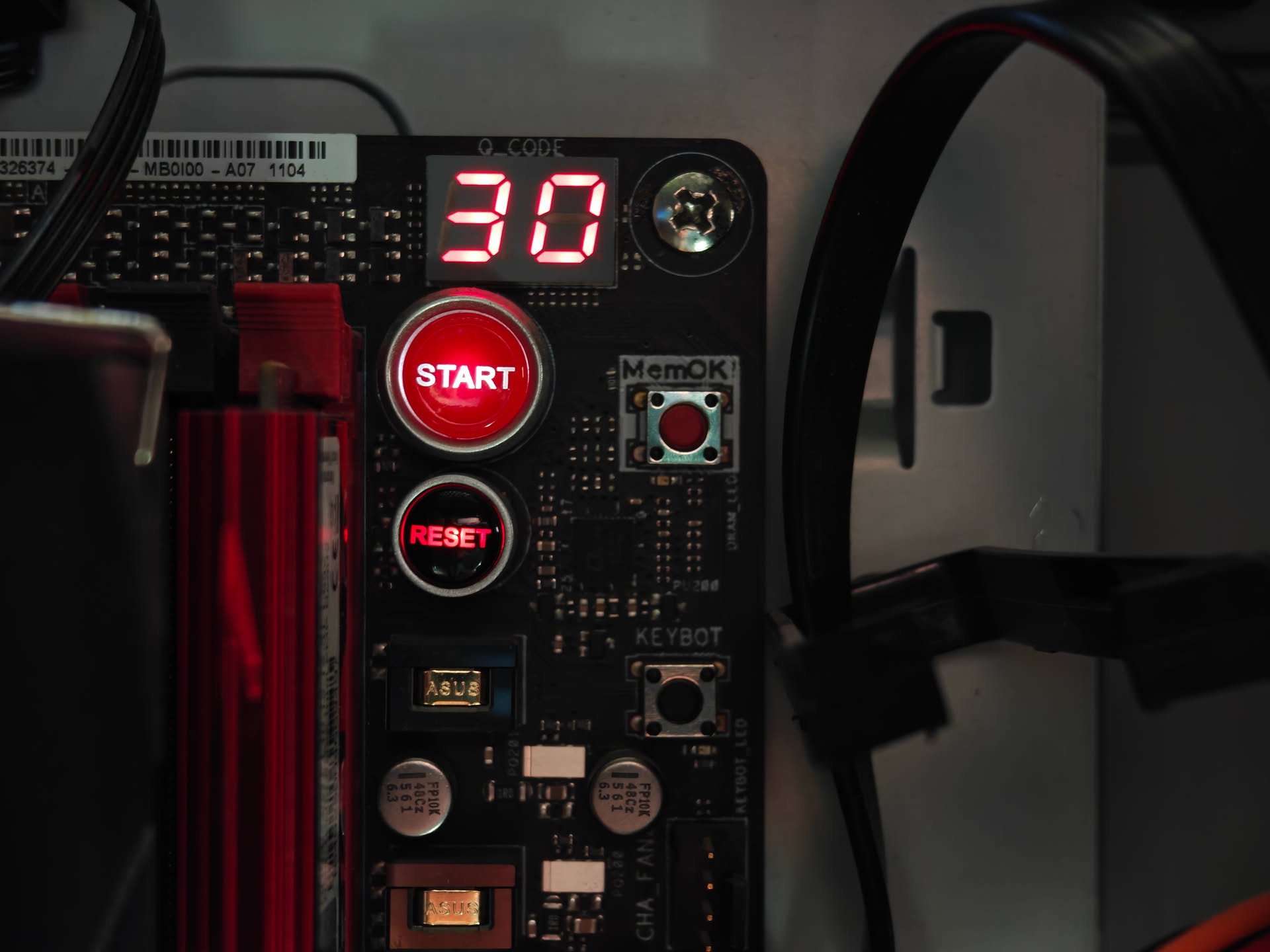
The motherboard is an ASUS ROG Maximus VII Hero. The board is black, with red accents, including the PCIe slots. On top of all of that, the board has red LEDs, one which lights up a logo, and the other which lights up the left side of the board, including some “SupremeFX” chip of sorts. It looks very tasteful, and isn’t “in-your-face”. In the top right corner, it’s got a little display, which can display an error code. And two buttons, one for power and one for reset. Both were very useful when putting this thing into a case. Otherwise, it’s a fairly standard motherboard layout.
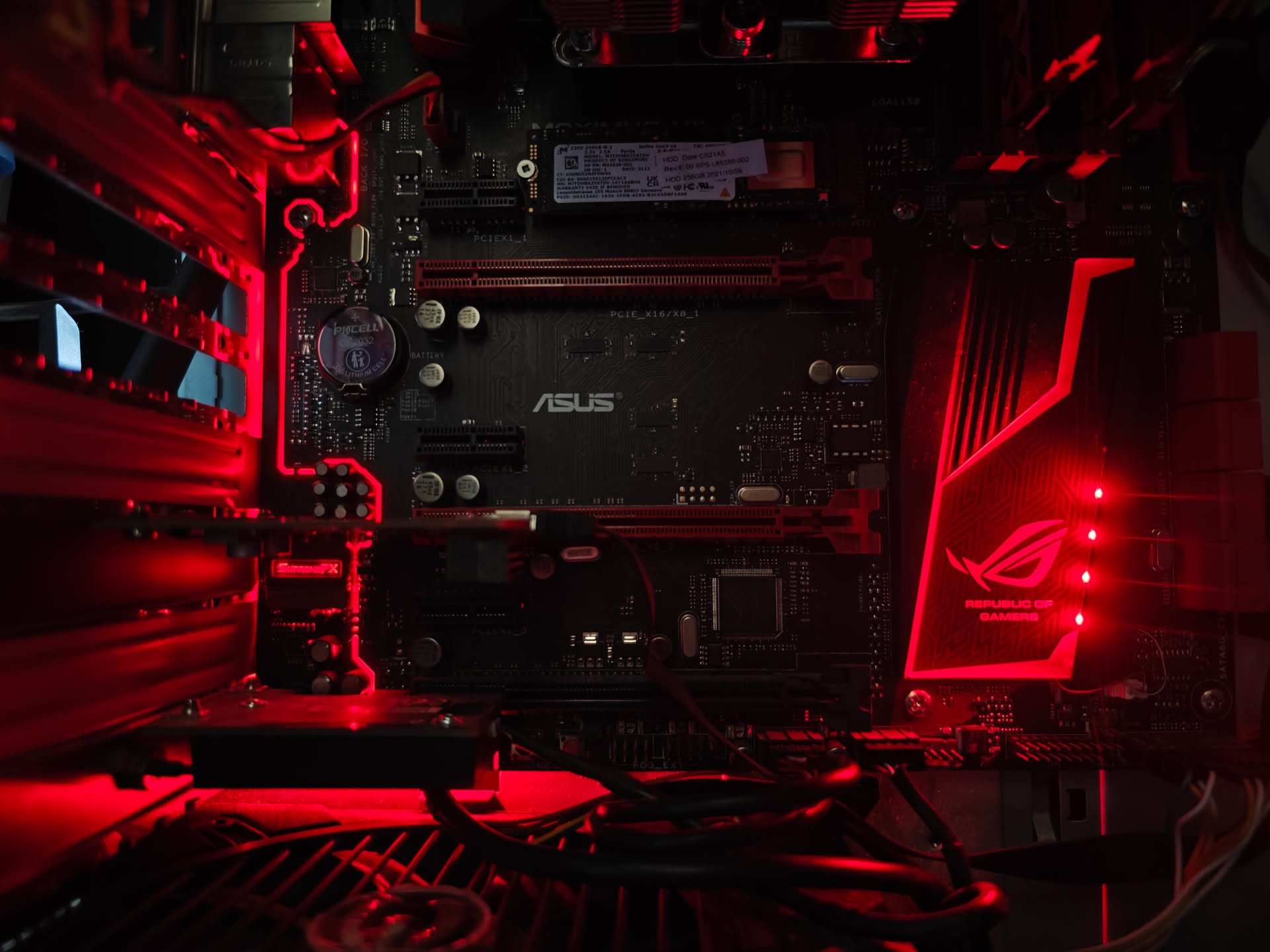
Lights on the motherboard. I took this photo in the dark. They look cooler that way.
The little display that lights up. I quite like it.
I/O.
Besides its nice design, this board has a fairly good selection of internal and external I/O on it. On the outside, it’s got surround audio jacks, four USB 3.0 ports, a gigabit Ethernet port, VGA, HDMI, and DVI out, two USB 2.0 (perfect for keyboards), and S/PDIF over TOSLINK for optical audio. Internally, it’s got a nice selection as well. It’s got 6 PCIe slots, three of which are x1 slots and disabled upon enabling M.2 mode, two USB 2.0 headers, a USB 3.0 header, HD audio header, some kind of fancy ASUS proprietary header thing, 8 SATA ports, the normal front panel stuff, four fan ports, four RAM slots, and, to top it all off, one NVMe slot. There’s probably some other stuff I’m missing, but as far as I’m concerned this thing is loaded with lots of headroom for the future (or, really, the present).
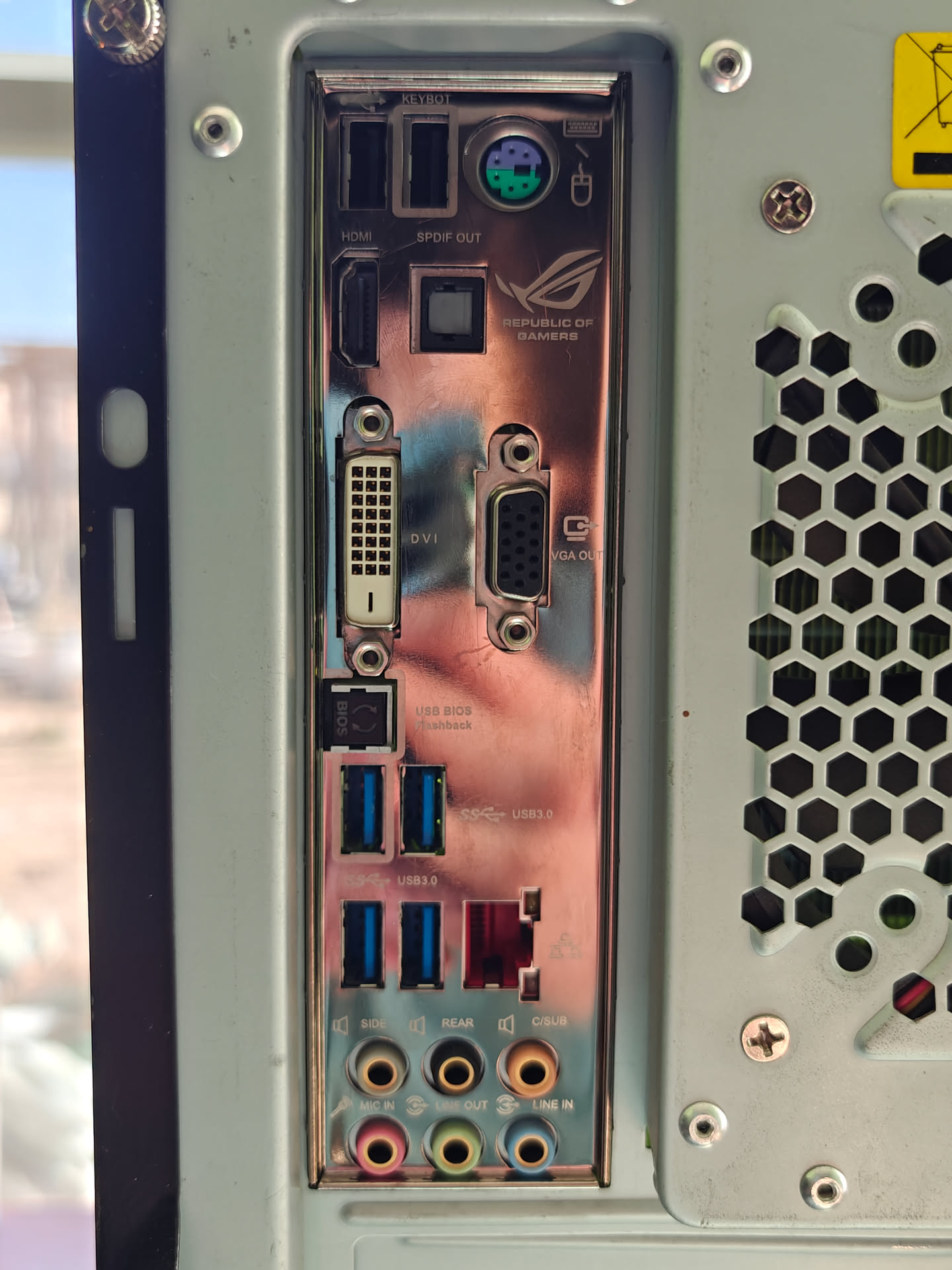
Rear I/O. It's got everything! Note that USB-C did not exist as a common standard in 2015.
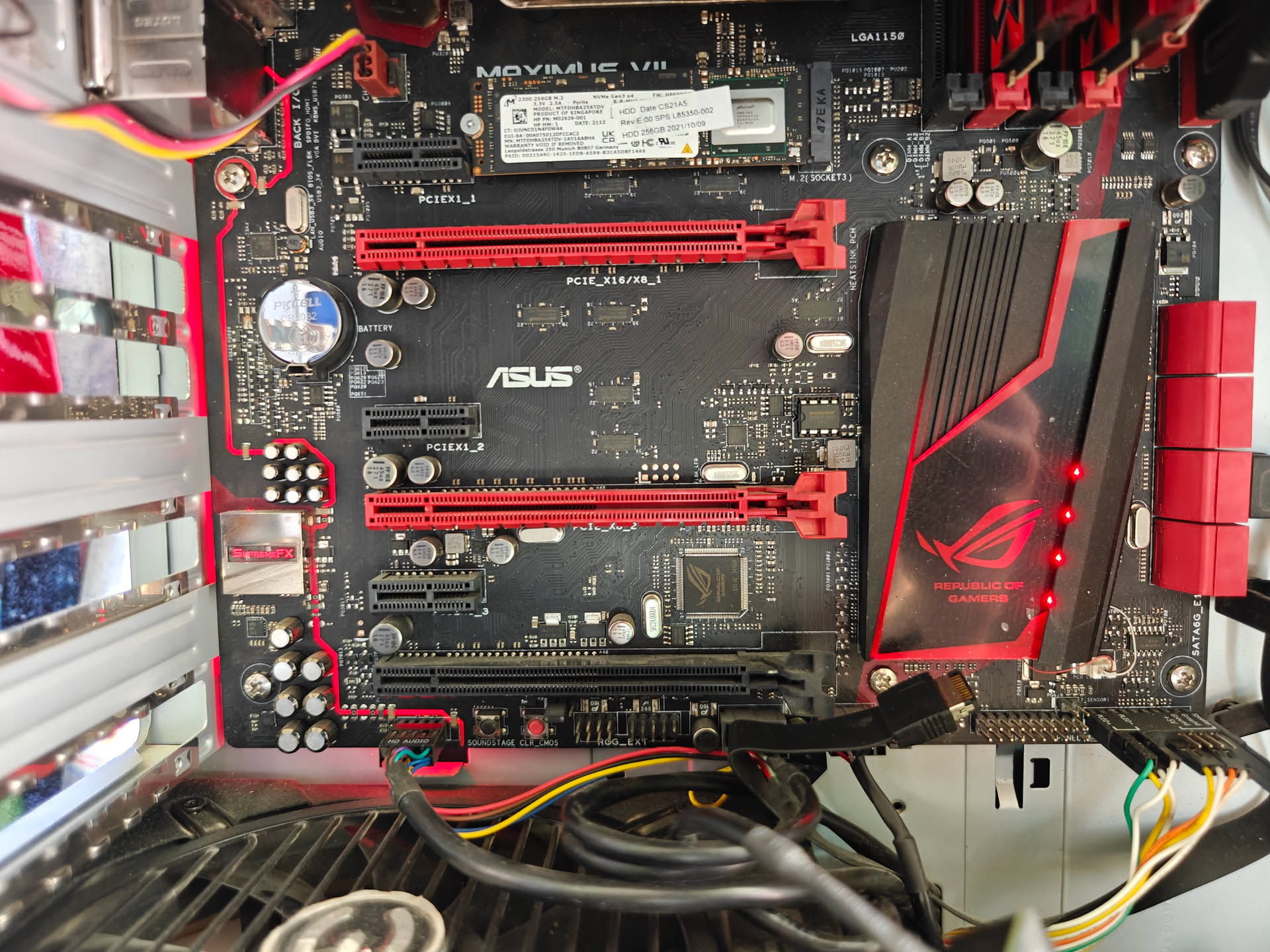
Internal I/O, well, more like PCIe slots.
CPU, RAM, GPU, and SSD.
I was given this board with all things necessary except an SSD and PSU. This board has an Intel Core i7-4790K, complete with stock cooler (more on that later), 16GB of DDR3-2400, and a NVIDIA GTX 770 made by MSI. The CPU also has its own integrated GPU, perfect for figuring out what’s wrong with your GPU, or saving power. I used my own SSD, some kind of Micron OEM drive that came with my laptop. The NVMe slot was too inviting to turn down, and so I figured I might as well use it.

The Intel Core i7-4790K. My fastest CPU yet. It can run at a full 4 GHz, with a turbo of 4.4 GHz. It's got four cores and eight threads.
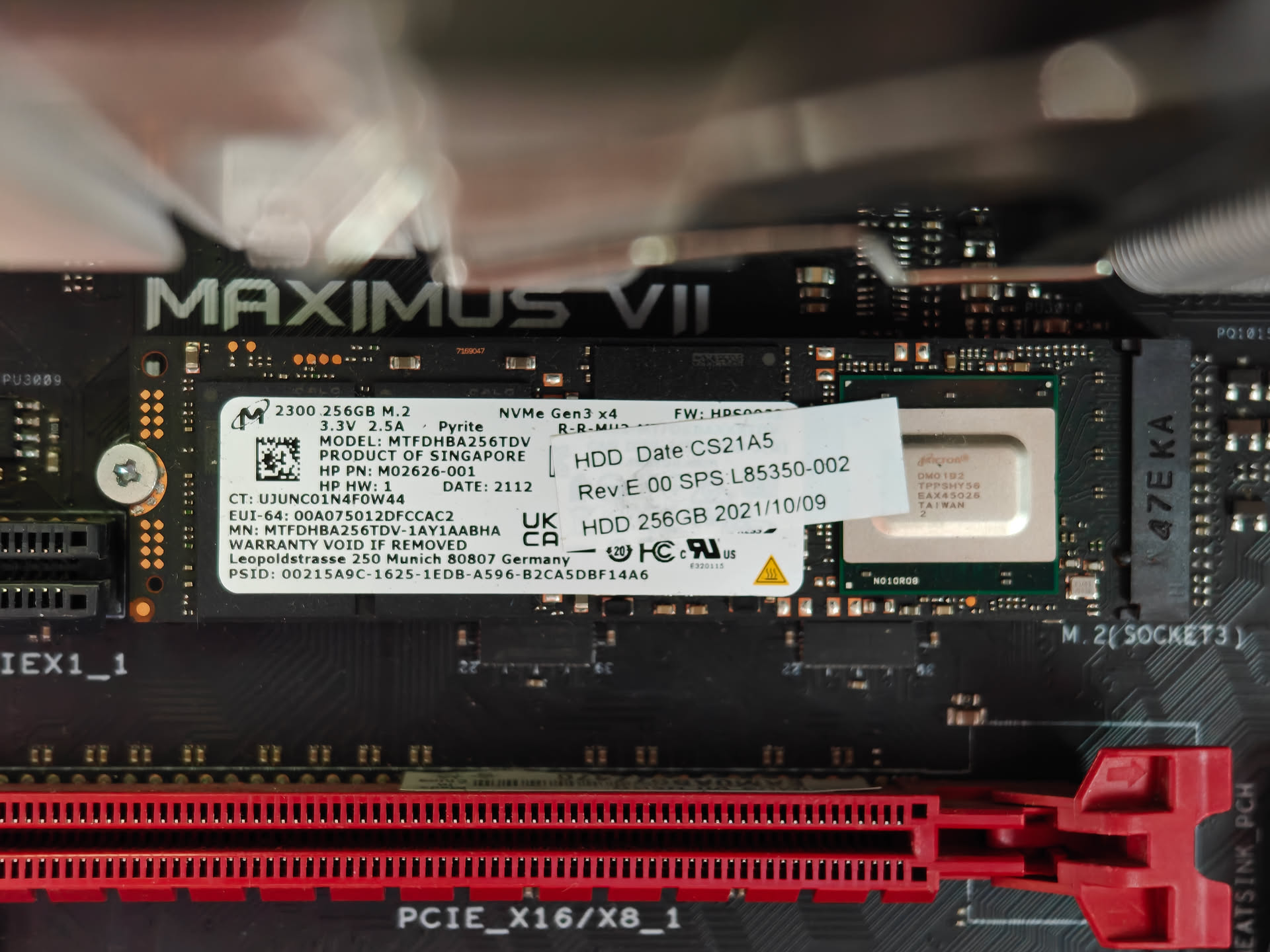
The NVMe SSD I stuck into the system. The slot is Gen 3, as far as I know, so a faster SSD is not necessary.
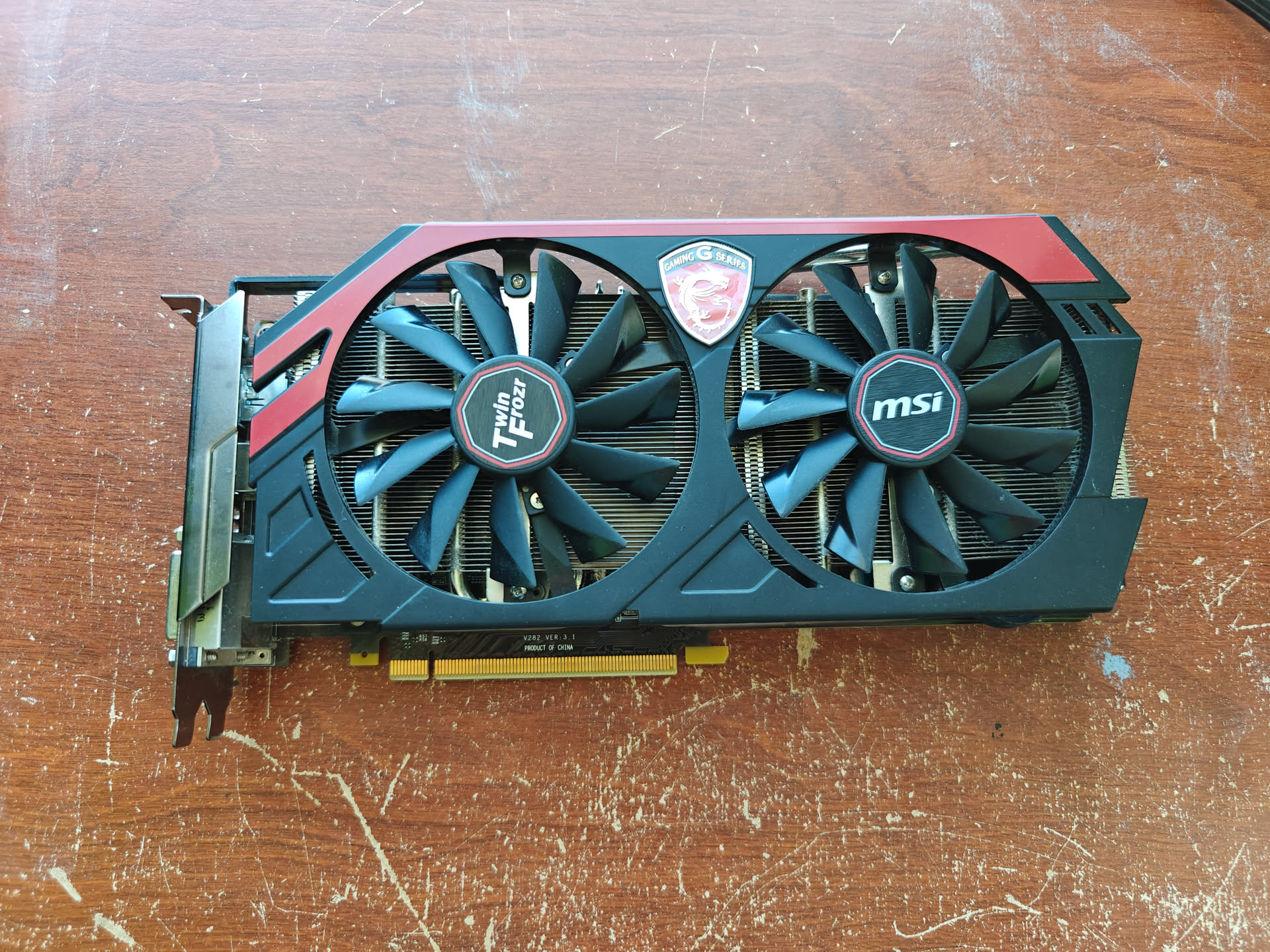
The MSI NVIDIA GTX 770 GPU I have. It has 2GB of VRAM.
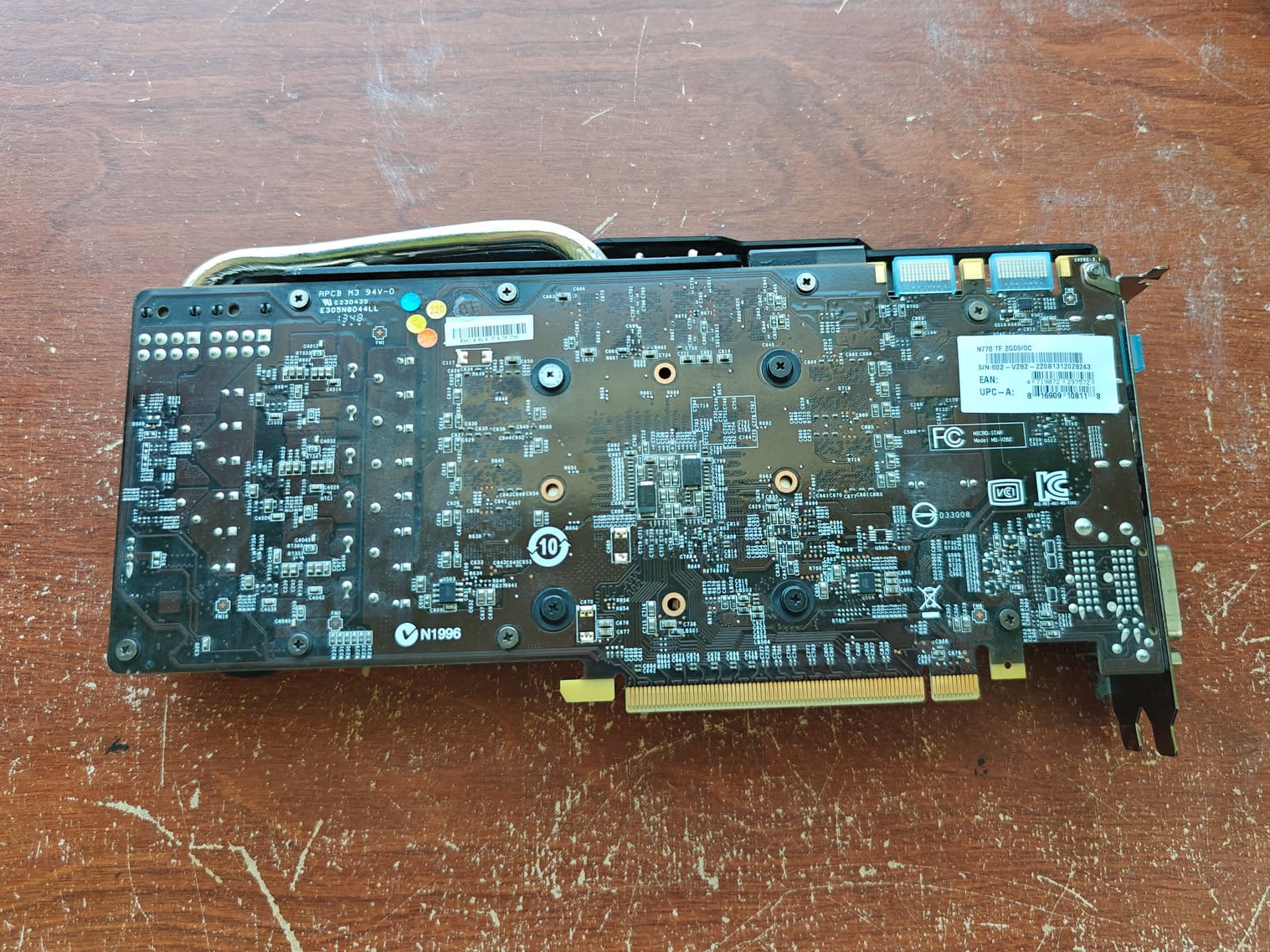
The rear of the card.
Setting it Up.
After going through all of the board’s physical parts, I needed to install it into a case with a PSU to power it up. Choosing was hard. I had the Oversized Tower, which has a Gigabyte EX58-UD3R with an i7-920 in it, or the NVIDIA tower, which has an ASUS P6X58D-E with an i7-930 in it, both with 750W power supplies. I chose the Oversized Tower.
I took out the old board, and then went to install the new one. I also had to take out the I/O shield of the old board and swap the new one in. The new shield has cushioning on it for the board, and feels quite nice. I slotted in the board, loosely cable-managed it (that case is bad for cable management), and powered it up.
Nothing. Just two zeros on the display, which the manual reassured me meant absolutely nothing. I then reset the BIOS, which got the machine to power on. I then went to go install the GPU, only to be met with the realization that I couldn’t. I’d overlooked the PSU in the case not having two 8-pin PCIe connectors. I set the GPU aside, since I was planning on swapping the board in the NVIDIA tower and the Oversized Tower around anyways.
Then I needed to install Windows. I am known for usually using Linux, but since I wanted to run all of my benchmarks, and most of those work on Windows only (annoyingly). Windows simply wouldn’t install. I realized I needed to enable the NVMe slot in the BIOS, so I went ahead and did that, and Windows installed. I then unplugged the machine, which had been laying on its side on a desk, to place it on the floor. I then went to turn it on, and the machine gave me two zeros again. Resetting the BIOS fixed it, and annoyingly I had to set all my settings again.
Then the machine simply wouldn’t boot off of the drive. I spent an hour poking around in the BIOS, before realizing that I needed to update the BIOS. Doing that fixed the NVMe issue, and I was able to finish setting up Windows, but it didn’t fix the double-zero issue.
Later that day, after eating dinner, I realized my NVMe-fueled tunnel vision led me to overlook one small thing: If the BIOS was resetting, in this case right after I unplugged the machine, isn’t this a power issue? I had somewhere that I was going that evening, and fifteen minutes before leaving, I popped a new CMOS battery in there. The machine did it again, I reset the BIOS, set it up, unplugged it, left it for a minute, plugged it in, and it worked! I finally had a fully-functional machine, save a fancy GPU.
GPU Issues.
A bit after I’d finished putting it all together, I took it apart again to transplant the board. This went fairly smoothly, and I could now finally run the 770 in it. I connected it to power, turned it on, only to get no display. I tried a different PCIe power cable, and still nothing happened. Either my power supply is bad, or the GPU is dead. If it’s dead, it’d probably be an interesting project to see if there’s a way to bring it back.
Performance.
Performance, at first, seemed a bit lackluster for such a powerful chip. I was pretty certain this thing could be my laptop, and yet it seemed to be having a hard time staying cool, hitting 60-80C in the BIOS. I ended up removing the stock cooler, cleaning the paste, and re-pasting it. Its paste was nearly non-existent. The stock cooler is one of the most annoying things Intel has invented. I have a couple others and they’re equally painful to deal with. After that, the system ran much cooler, though two of the cores seemed to be running a bit hotter than the others. I took the cooler off to try and see if my paste had spread nicely, and in the process I accidentally damaged the push-pins on the cooler. Despite my repair attempts, that cooler wasn’t going back on the chip anytime soon. I had to use $40 of my savings on a cooler. That was worth it. The CPU was running significantly cooler, and the machine was quieter. That was $40 well spent.
It also allowed the machine to beat my laptop in practically every multi-core benchmark. My laptop, in theory, is faster, but due to being a laptop with weaker cooling, its multi-core turbo is reduced. The desktop, on the other hand, consistently maintained a 4.4GHz turbo while running a multi-core task over the course of ten minutes. I’ve never had performance this fast. Of course, I have the benchmark scores in a spreadsheet, so here’s the screenshots of them:
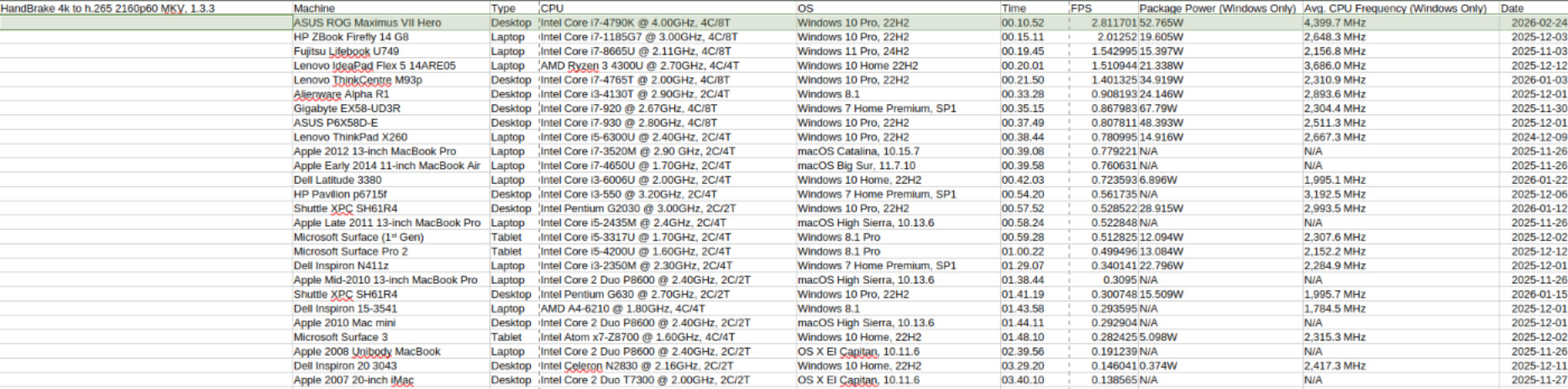
HandBrake 4k H.265 encoding test, taken from HERE.
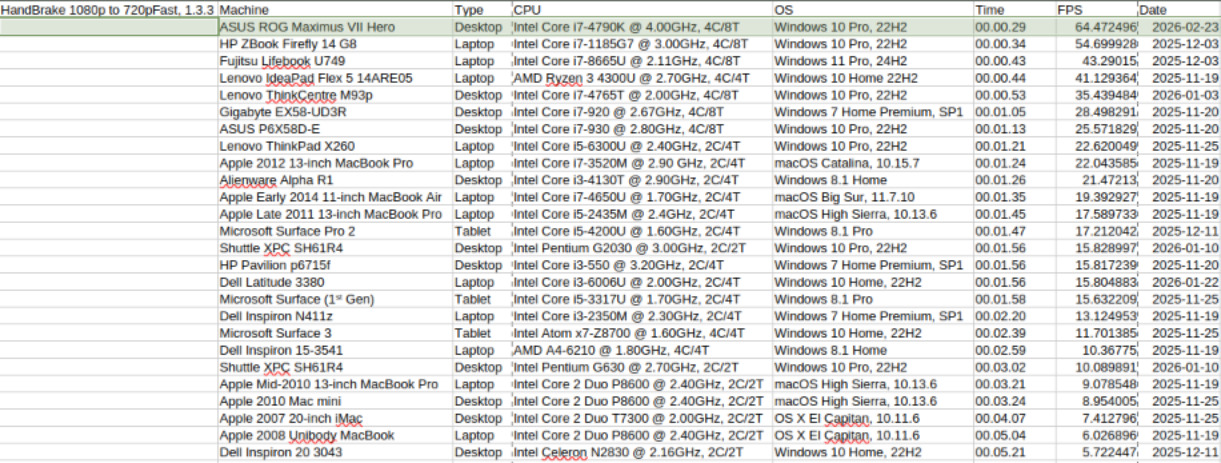
My own homemade HandBrake 1080p test, based off of the one linked in the 4k benchmark screenshot.
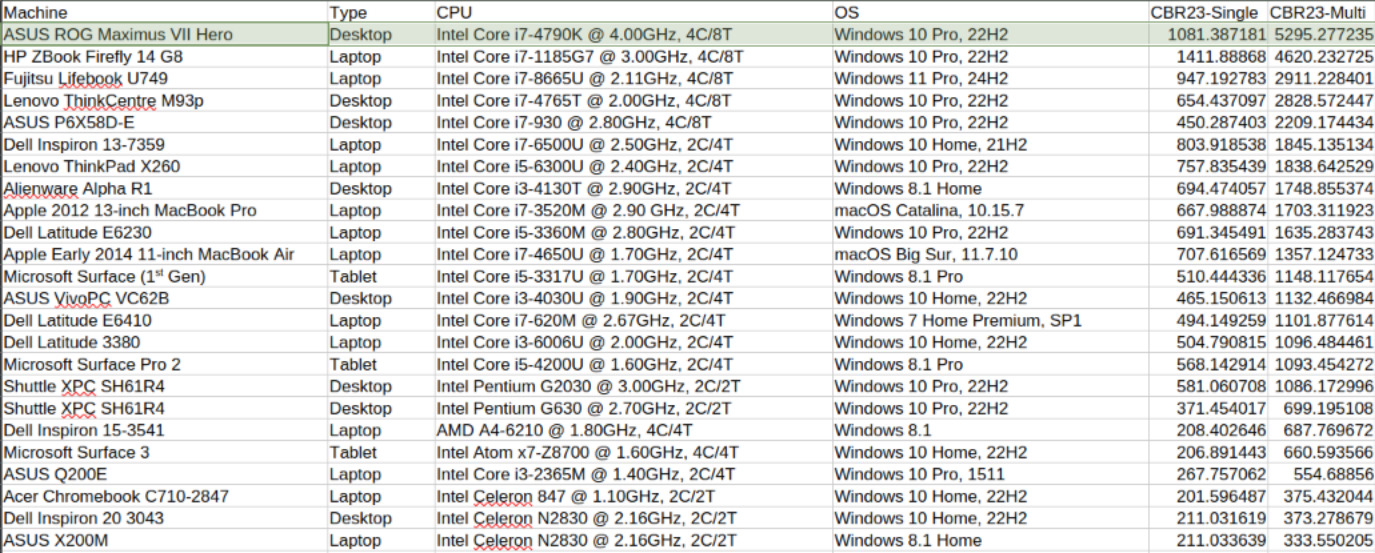
Cinebench R23 scores.
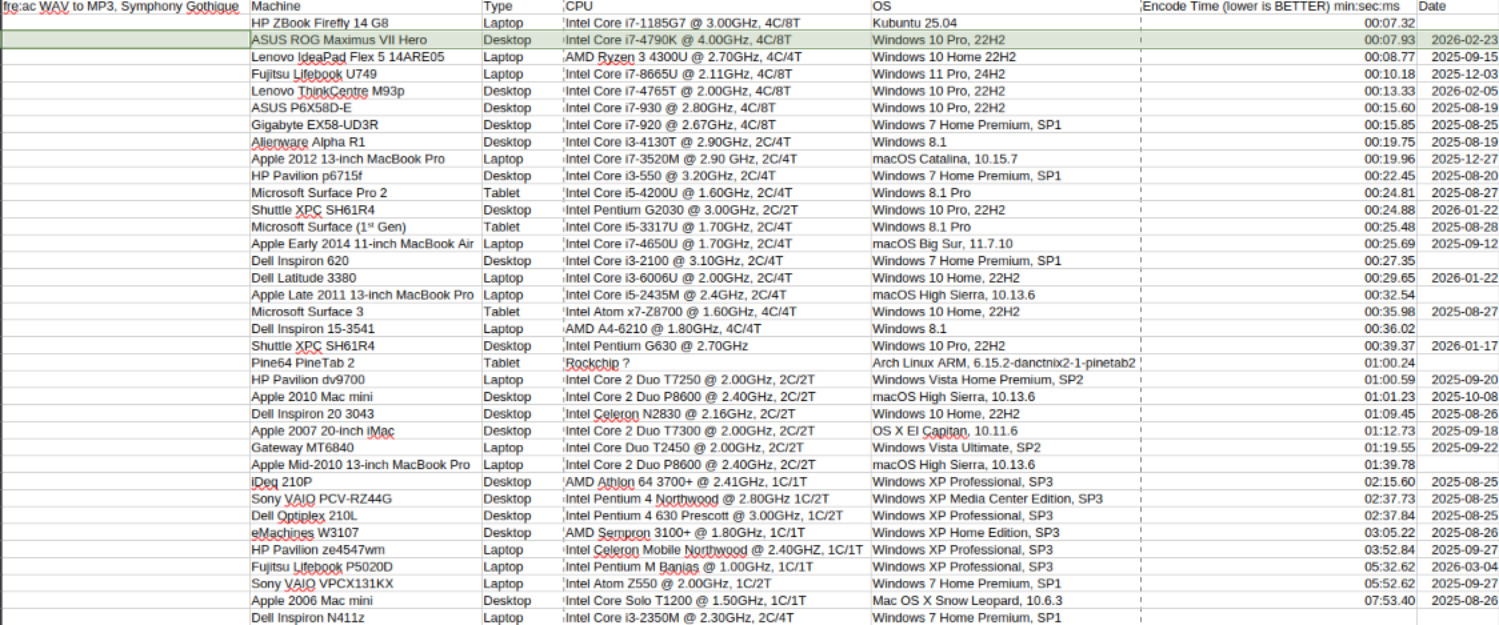
fre:ac WAV to MP3 encoding test, using David Hicken's Symphony Gothique album.
And, unlike a lot of laptops from that era, this can play H.265 4k25 video in full-screen with practically no stuttering. The Intel-grated GPU the CPU has on it can’t decode it, but the CPU is strong enough to decode it in real-time, albeit with nearly all of its power being used up. H.265 is very power-hungry, but very small. It’s impressive to see this machine be able to do that on the CPU. If I was to add in the RX570 I had, it’d use the GPU (I actually bought that card with H.265 in mind).
Overall, performance is amazing, and I’m very happy to see it’s able to handle just about any CPU-bound task I throw at it.
Since I can’t test the GTX770, the next best thing is to test its Intel-grated Intel HD Graphics 4600 with Unigine Valley, as normal:
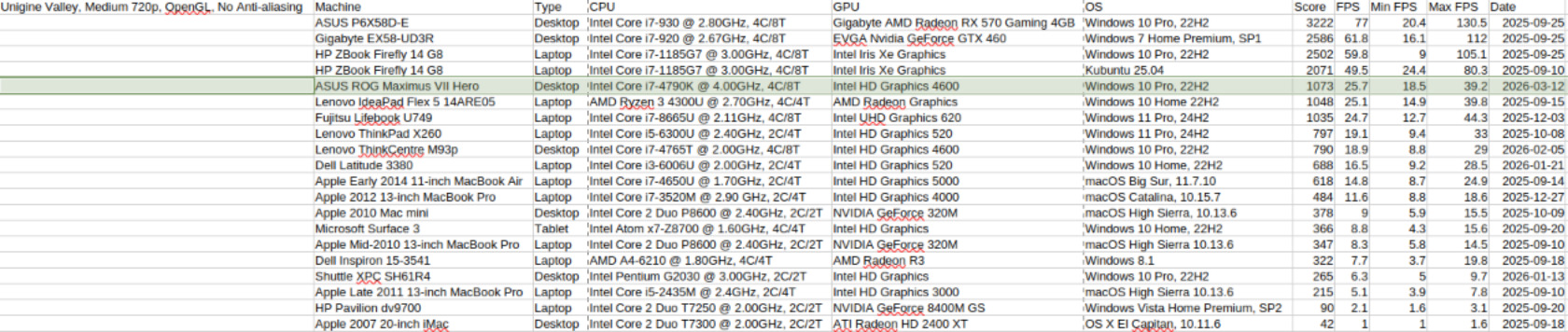
Unigine Valley score.
Epilogue.
This is the best motherboard I’ve ever used. It has absolutely everything I could need on it. I can even overclock the thing if I want to. It’s simply perfect in nearly every way.
I haven’t tested very many “everyday tasks” on this machine, as I’m pretty certain most will run just fine.
Overall, it’s a very powerful, full-featured motherboard that, despite its age of ten years, has held up well, and should continue to do so for years to come.
Other Stuff.
Last post I mentioned this board, but I’m not certain about the next post. There are a few things bouncing around in my head. I’ve been meaning to add an “about” section to this site, so I may very well just do that. The other thing I’ve had bouncing around is some Intel Atom systems I have laying around that need HandBrake benchmarking. I have an Acer Aspire Revo, and a Foxconn nt-330i that both need benchmarking, and both have 64-bit CPUs that can run Windows 7. That project has (quite literally) been shelved for a while, and I’d like to wrap it up soon.
And, of course, your Weekly Chicken Update! This week, most of the chickens, except Gaby, seem to have figured out the feeder. I have another one coming soon so they quit fighting over the one feeder. Gaby, unfortunately, is too scared to try it. Hopefully the quiet-close attachment I got will solve that issue. Agathae is also planning on going broody. Again. And they don't want to use any of the other nesting boxes. Again.

Felicitas in the Chosen Nest.

Empress Josephine.

Agathae-Hen the Broody. You can't hear the noises she's been making in this photo, though.
That about wraps it up for this post!